


A focused and highly customizable fan controlling software for Windows.
Sources for this software are closed.

JayzTwoCents — Everyone NEEDS this FREE piece of software... You will thank me!
- Announcement
- Main Features
- Installation & Uninstall
- Plugins
- Issues & Hardware Compatibility
- FAQ
- Libraries Used
- GitHub Sponsors
-
NEW: Fan Control can now be started on boot as a service, without any user session.
-
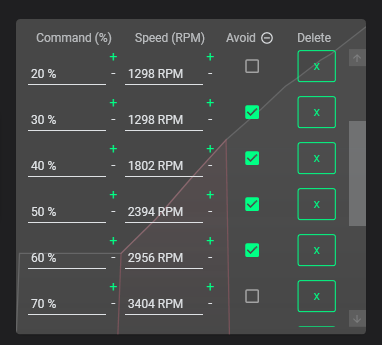
NEW: Calibration avoid points: set avoid points if you want your fans to never run in at a specific % that may rattle or emit an annoying noise.
-
FanControl, its installer and the updater now have a signed executable, which should help with AVs false flagging.
-
V238 and above now ships with a PawnIO build of LHM. This fixes the anti-virus problems encountered with WinRing0, as it is no longer shipped with FanControl. Note that as of 09/04/2025, WinRing0 (FanControl.sys) used in V237 and below is flagged as Trojan:Win32/Vigorf.A by Windows Defender, causing sensors to not be detected — updating to V238 or later is the recommended fix.
-
The FaceIT issue was fixed with the 2.1.0 PawnIO version.

- Guided setup process on first launch
- Save, edit and load multiple profiles
- Change the theme and color of the application
- Multiple temperature sources (CPU, GPU, motherboard, hard drives...)
- Multiple fan curve functions, including a custom graph
- Mix fan curves or sensors together (max, min, average)
- Low resource usage
- Advanced tuning with steps, start %, stop %, response time and hysteresis
Full documentation is available at getfancontrol.com/docs.
- Download the latest archive or an installer from the release page.
- Extract to the desired installation folder or run the installer.
- Start
FanControl.exe.
Other install methods (Scoop / Winget / Chocolatey)
scoop bucket add extras
scoop install fancontrol
winget install Rem0o.FanControl