


video.mp4
A tool for automatically converting mitmproxy captures to OpenAPI 3.0 specifications. This means that you can automatically reverse-engineer REST APIs by just running the apps and capturing the traffic.
🆕 NEW!
Added support for processing HAR exported from the browser DevTools. See Usage - HAR for more details.
First you will need python3 and pip3.
$ pip install mitmproxy2swagger
# ... or ...
$ pip3 install mitmproxy2swagger
# ... or ...
$ git clone [email protected]:alufers/mitmproxy2swagger.git
$ cd mitmproxy2swagger
$ docker build -t mitmproxy2swagger .
Then clone the repo and run mitmproxy2swagger as per examples below.
To create a specification by inspecting HTTP traffic you will need to:
-
Capture the traffic by using the mitmproxy tool. I personally recommend using mitmweb, which is a web interface built-in to mitmproxy.
$ mitmweb
Web server listening at http://127.0.0.1:8081/
Proxy server listening at http://*:9999
...
IMPORTANT
To configure your client to use the proxy exposed by mitm proxy, please consult the mitmproxy documentation for more information.
-
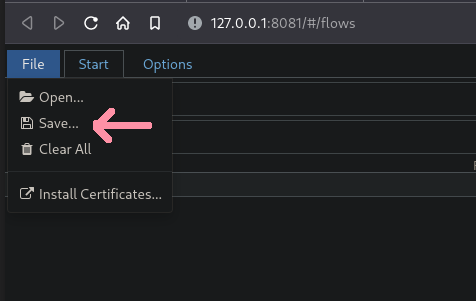
Save the traffic to a flow file.
In mitmweb you can do this by using the "File" menu and selecting "Save":
-
Run the first pass of mitmproxy2swagger:
$ mitmproxy2swagger -i <path_to_mitmptoxy_flow> -o <path_to_output_schema> -p <api_prefix>
# ... or ...
$ docker run -it -v $PWD:/app mitmproxy2swagger mitmproxy2swagger -i <path_to_mitmptoxy_flow> -o <path_to_output_schema> -p <api_prefix>
Please note that you can use an existing schema, in which case the existing schema will be extended with the new data. You can also run it a few times with different flow captures, the captured data will be safely merged.
<api_prefix>is the base url of the API you wish to reverse-engineer. You will need to obtain it by observing the requests being made in mitmproxy.For example if an app has made requests like these:
https://api.example.com/v1/login
