


Click ⭐ if you like the project. Pull Requests are highly appreciated. Follow me @SudheerJonna for technical updates.

Practice 280+ JavaScript coding interview questions in-browser. Built by ex-FAANG interviewers. No AI-generated fluff. No fake reviews. Try GreatFrontEnd → 💡

I recommend this React course to become top 10% at React and this coding interview bootcamp to ace your coding interview and actually get hired.

Note: This repository is specific to ReactJS. Please check JavaScript Interview Questions for core JavaScript questions and Data Structures and Algorithms for DSA-related questions or problems.
Hide/Show table of contents
Hide/Show table of contents
-
React (aka React.js or ReactJS) is an open-source front-end JavaScript library for building user interfaces based on components. It's used for handling the view layer in web and mobile applications, and allows developers to create reusable UI components and manage the state of those components efficiently.
React was created by Jordan Walke, a software engineer at Facebook (now Meta). It was first deployed on Facebook's News Feed in 2011 and on Instagram in 2012. The library was open-sourced in May 2013 and has since become one of the most popular JavaScript libraries for building modern user interfaces.
-
The history of ReactJS started in 2010 with the creation of XHP. XHP is a PHP extension which improved the syntax of the language such that XML document fragments become valid PHP expressions and the primary purpose was used to create custom and reusable HTML elements.
The main principle of this extension was to make front-end code easier to understand and to help avoid cross-site scripting attacks. The project was successful to prevent the malicious content submitted by the scrubbing user.
But there was a different problem with XHP in which dynamic web applications require many roundtrips to the server, and XHP did not solve this problem. Also, the whole UI was re-rendered for small change in the application. Later, the initial prototype of React is created with the name FaxJ by Jordan inspired from XHP. Finally after sometime React has been introduced as a new library into JavaScript world.
See deep-dive answer
The evolution of React has a fascinating history that spans over a decade:2010-2011: The Origins
- The journey began with XHP, a PHP extension created at Facebook that allowed HTML components to be used in PHP code
- XHP improved front-end code readability and helped prevent cross-site scripting (XSS) attacks
- However, XHP had limitations with dynamic web applications, requiring frequent server roundtrips and complete UI re-renders for small changes
2011-2012: Early Development
- Jordan Walke created the first prototype called FaxJS (later renamed to React), inspired by XHP's component model
- The key innovation was bringing XHP's component model to JavaScript with performance improvements
- React introduced the Virtual DOM concept to solve the performance issues of full page re-renders
- First deployed internally on Facebook's News Feed in 2011 and Instagram in 2012
2013: Public Release
- React was officially open-sourced at JSConf US in May 2013
- Initial public reception was mixed, with some developers skeptical about the JSX syntax and the approach of mixing markup with JavaScript
2014-2015: Growing Adoption
- React Native was announced in 2015, extending React's paradigm to mobile app development
- The ecosystem began to grow with tools like Redux for state management
- Companies beyond Facebook began adopting React for production applications
2016-2018: Maturation
- React 16 ("Fiber") was released in 2017 with a complete rewrite of the core architecture
- Introduction of new features like Error Boundaries, Portals, and improved server-side rendering
- React 16.3 introduced the Context API for easier state management
2019-Present: Modern React
- React Hooks were introduced in React 16.8 (February 2019), revolutionizing state management in functional components
- React 17 (October 2020) focused on making React upgrades easier
- React 18 (March 2022) introduced concurrent rendering and automatic batching
- React continues to evolve with Server Components, the new React compiler (React Forget), and other performance improvements
Note: JSX, React's syntax extension, was indeed inspired by XHP's approach of embedding XML-like syntax in code.
-
React offers a powerful set of features that have made it one of the most popular JavaScript libraries for building user interfaces:
Core Features:
-
Component-Based Architecture: React applications are built using components - independent, reusable pieces of code that return HTML via a render function. This modular approach enables better code organization, reusability, and maintenance.
-
Virtual DOM: React creates an in-memory data structure cache, computes the resulting differences, and efficiently updates only the changed parts in the browser DOM. This approach significantly improves performance compared to direct DOM manipulation.
-
JSX (JavaScript XML): A syntax extension that allows writing HTML-like code in JavaScript. JSX makes the code more readable and expressive while providing the full power of JavaScript.
-
Unidirectional Data Flow: React follows a one-way data binding model where data flows from parent to child components. This makes the code more predictable and easier to debug.
-
Declarative UI: React allows you to describe what your UI should look like for a given state, and it handles the DOM updates when the underlying data changes.
Advanced Features:
-
React Hooks: Introduced in React 16.8, hooks allow using state and other React features in functional components without writing classes.
-
Context API: Provides a way to share values between components without explicitly passing props through every level of the component tree.
-
Error Boundaries: Components that catch JavaScript errors anywhere in their child component tree and display fallback UI instead of crashing.
-
Server-Side Rendering (SSR): Enables rendering React components on the server before sending HTML to the client, improving performance and SEO.
-
Concurrent Mode: A set of new features (in development) that help React apps stay responsive and gracefully adjust to the user's device capabilities and network speed.
-
React Server Components: A new feature that allows components to be rendered entirely on the server, reducing bundle size and improving performance.
-
Suspense: A feature that lets your components "wait" for something before rendering, supporting code-splitting and data fetching with cleaner code.
These features collectively make React powerful for building everything from small widgets to complex, large-scale web applications.
-
-
JSX stands for JavaScript XML and it is an XML-like syntax extension to ECMAScript. Basically it just provides the syntactic sugar for the
React.createElement(type, props, ...children)function, giving us expressiveness of JavaScript along with HTML like template syntax.In the example below, the text inside
<h1>tag is returned as JavaScript function to the render function.export default function App() { return <h1 className="greeting">{"Hello, this is a JSX Code!"}</h1>; }
If you don't use JSX syntax then the respective JavaScript code should be written as below,
import { createElement } from "react";

export default function App() {
  return createElement(
    "h1",
    { className: "greeting" },
    "Hello, this is a JSX Code!"
  );
}
See Class
class App extends React.Component {
  render() {
    return <h1 className="greeting">{"Hello, this is a JSX Code!"}</h1>;
  }
}
Note: JSX is stricter than HTML
-
Element:
-
A React Element is a plain JavaScript object that describes what you want to see on the UI. It represents a DOM node or a component at a specific point in time.
-
Elements are immutable: once created, you cannot change their properties. Instead, you create new elements to reflect updates.
-
Elements can be nested within other elements through their
props. -
Creating an element is a fast, lightweight operation—it does not create any actual DOM nodes or render anything to the screen directly.
Example (without JSX):
const element = React.createElement("button", { id: "login-btn" }, "Login");
Equivalent JSX syntax:
<button id="login-btn">Login</button>
The object returned by
React.createElement:{ type: 'button', props: { id: 'login-btn', children: 'Login' } }
Elements are then passed to the React DOM renderer (e.g.,
ReactDOM.render()), which translates them to actual DOM nodes.
Component:
-
A Component is a function or class that returns an element (or a tree of elements) to describe part of the UI. Components can accept inputs (called props) and manage their own state (in case of class or function components with hooks).
-
Components allow you to split the UI into independent, reusable pieces, each isolated and composable.
-
You can define a component using a function or a class:
Example (Function Component with JSX):
const Button = ({ handleLogin }) => (
  <button id="login-btn" onClick={handleLogin}>
    Login
  </button>
);
When JSX is compiled, it's transformed into a tree of
React.createElementcalls:const Button = ({ handleLogin }) => React.createElement( "button", { id: "login-btn", onClick: handleLogin }, "Login" );
In summary:
- Elements are the smallest building blocks in React—objects that describe what you want to see.
- Components are functions or classes that return elements and encapsulate logic, structure, and behavior for parts of your UI.
Think of elements as the instructions for creating UI, and components as reusable blueprints that combine logic and structure to generate those instructions.
-
-
Components are the building blocks of creating User Interfaces(UI) in React. There are two possible ways to create a component.
-
Function Components: This is the simplest way to create a component. Those are pure JavaScript functions that accept props object as the one and only one parameter and return React elements to render the output:
function Greeting({ message }) {
  return <h1>{`Hello, ${message}`}</h1>;
}
-
Class Components: You can also use ES6 class to define a component. The above function component can be written as a class component:
class Greeting extends React.Component {
  render() {
    return <h1>{`Hello, ${this.props.message}`}</h1>;
  }
}
-
-
After the addition of Hooks(i.e. React 16.8 onwards) it is always recommended to use Function components over Class components in React. Because you could use state, lifecycle methods and other features that were only available in class component present in function component too.
But even there are two reasons to use Class components over Function components.
- If you need a React functionality whose Function component equivalent is not present yet, like Error Boundaries.
- In older versions, If the component needs state or lifecycle methods then you need to use class component.
So the summary to this question is as follows:
Use Function Components:
- If you don't need state or lifecycle methods, and your component is purely presentational.
- For simplicity, readability, and modern code practices, especially with the use of React Hooks for state and side effects.
Use Class Components:
- If you need to manage state or use lifecycle methods.
- In scenarios where backward compatibility or integration with older code is necessary.
Note: You can also use reusable react error boundary third-party component without writing any class. i.e, No need to use class components for Error boundaries.
The usage of Error boundaries from the above library is quite straight forward.
Note when using react-error-boundary: ErrorBoundary is a client component. You can only pass props to it that are serializable or use it in files that have a
"use client";directive."use client"; import { ErrorBoundary } from "react-error-boundary"; <ErrorBoundary fallback={<div>Something went wrong</div>}> <ExampleApplication /> </ErrorBoundary>;
-
Pure components are the components which render the same output for the same state and props. In function components, you can achieve these pure components through memoized
React.memo()API wrapping around the component. This API prevents unnecessary re-renders by comparing the previous props and new props using shallow comparison. So it will be helpful for performance optimizations.But at the same time, it won't compare the previous state with the current state because function component itself prevents the unnecessary rendering by default when you set the same state again.
The syntactic representation of memoized components looks like below,
const MemoizedComponent = memo(SomeComponent, arePropsEqual?);
Below is the example of how child component(i.e., EmployeeProfile) prevents re-renders for the same props passed by parent component(i.e.,EmployeeRegForm).
import { memo, useState } from "react";

const EmployeeProfile = memo(function EmployeeProfile({ name, email }) {
  return (
    <>
      <p>Name:{name}</p>
      <p>Email: {email}</p>
    </>
  );
});
export default function EmployeeRegForm() {
  const [name, setName] = useState("");
  const [email, setEmail] = useState("");
  return (
    <>
      <label>
        Name:{" "}
        <input value={name} onChange={(e) => setName(e.target.value)} />
      </label>
      <label>
        Email:{" "}
        <input value={email} onChange={(e) => setEmail(e.target.value)} />
      </label>
      <hr />
      <EmployeeProfile name={name} />
    </>
  );
}
In the above code, the email prop has not been passed to child component. So there won't be any re-renders for email prop change.
In class components, the components extending
React.PureComponentinstead ofReact.Componentbecome the pure components. When props or state changes, PureComponent will do a shallow comparison on both props and state by invokingshouldComponentUpdate()lifecycle method.Note:
React.memo()is a higher-order component. -
State of a component is an object that holds some information that may change over the lifetime of the component. The important point is whenever the state object changes, the component re-renders. It is always recommended to make our state as simple as possible and minimize the number of stateful components.
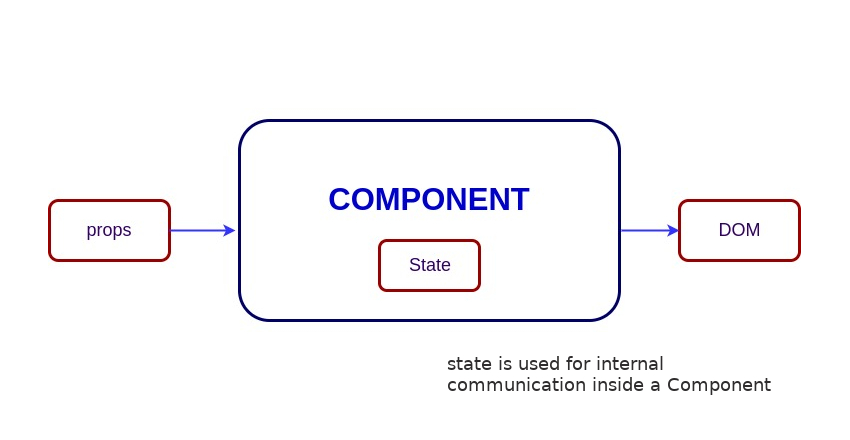
Let's take an example of User component with
messagestate. Here, useState hook has been used to add state to the User component and it returns an array with current state and function to update it.import { useState } from "react"; function User() { const [message, setMessage] = useState("Welcome to React world"); return ( <div> <h1>{message}</h1> </div> ); }
Whenever React calls your component or access
useStatehook, it gives you a snapshot of the state for that particular render.See Class
import React from "react";
class User extends React.Component {
  constructor(props) {
    super(props);

    this.state = {
      message: "Welcome to React world",
    };
  }

  render() {
    return (
      <div>
        <h1>{this.state.message}</h1>
      </div>
    );
  }
}
State is similar to props, but it is private and fully controlled by the component ,i.e., it is not accessible to any other component till the owner component decides to pass it.
-
Props are inputs to components. They are single values or objects containing a set of values that are passed to components on creation similar to HTML-tag attributes. Here, the data is passed down from a parent component to a child component.
The primary purpose of props in React is to provide following component functionality:
- Pass custom data to your component.
- Trigger state changes.
- Use via
this.props.reactPropinside component'srender()method.
For example, let us create an element with
reactPropproperty:<Element reactProp={"1"} />
This
reactProp(or whatever you came up with) attribute name then becomes a property attached to React's native props object which originally already exists on all components created using React library.props.reactProp;
For example, the usage of props in function component looks like below:
import React from "react";
import ReactDOM from "react-dom";

const ChildComponent = (props) => {
  return (
    <div>
      <p>{props.name}</p>
      <p>{props.age}</p>
      <p>{props.gender}</p>
    </div>
  );
};

const ParentComponent = () => {
  return (
    <div>
      <ChildComponent name="John" age="30" gender="male" />
      <ChildComponent name="Mary" age="25" geneder="female" />
    </div>
  );
};

The properties from props object can be accessed directly using destructing feature from ES6 (ECMAScript 2015). It is also possible to fallback to default value when the prop value is not specified. The above child component can be simplified like below.
const ChildComponent = ({ name, age, gender = "male" }) => {
  return (
    <div>
      <p>{name}</p>
      <p>{age}</p>
      <p>{gender}</p>
    </div>
  );
};
Note: The default value won't be used if you pass null or 0 value. i.e, default value is only used if the prop value is missed or undefined value has been passed.
See Class
The Props accessed in Class Based Component as belowimport React from "react";
import ReactDOM from "react-dom";
class ChildComponent extends React.Component {
render() {
return (
<div>
<p>{this.props.name}</p>
<p>{this.props.age}</p>
<p>{this.props.gender}</p>
</div>
);
}
}
class ParentComponent extends React.Component {
render() {
return (
<div>
<ChildComponent name="John" age="30" gender="male" />
<ChildComponent name="Mary" age="25" gender="female" />
</div>
);
}
}-
In React, both state and props are plain JavaScript objects, but they serve different purposes and have distinct behaviors:
- Definition:
State is a data structure that is managed within a component. It represents information that can change over the lifetime of the component. - Mutability:
State is mutable, meaning it can be changed using the setter function (setStatein class components or the updater function fromuseStatein functional components). - Scope:
State is local to the component where it is defined. Only that component can modify its own state. - Usage:
State is typically used for data that needs to change in response to user actions, network responses, or other dynamic events. - Re-rendering:
Updating the state triggers a re-render of the component and its descendants.
- Definition:
Props (short for “properties”) are inputs to a component, provided by its parent component. - Mutability:
Props are read-only. A component cannot modify its own props; they are immutable from the component’s perspective. - Scope:
Props are used to pass data and event handlers down the component tree, enabling parent components to configure or communicate with their children. - Usage:
Props are commonly used to make components reusable and configurable. They allow the same component to be rendered with different data or behavior. - Analogy:
Think of props as arguments to a function, whereas state is like variables declared inside the function.
Feature State Props Managed by The component itself Parent component Mutable Yes No (read-only) Scope Local to the component Passed from parent to child Usage Manage dynamic data and UI changes Configure and customize component Update Using setState/useState Cannot be updated by the component
- Definition:
-
Below are some of the main differences between HTML and React event handling,
-
In HTML, the event name usually represents in lowercase as a convention:
<button onclick="activateLasers()"></button>
Whereas in React it follows camelCase convention:
<button onClick={activateLasers}>
-
In HTML, you can return
falseto prevent default behavior:<a href="#" onclick='console.log("The link was clicked."); return false;' />
Whereas in React you must call
preventDefault()explicitly:function handleClick(event) { event.preventDefault(); console.log("The link was clicked."); }
-
In HTML, you need to invoke the function by appending
()Whereas in react you should not append()with the function name. (refer "activateLasers" function in the first point for example)
-
-
SyntheticEventis a cross-browser wrapper around the browser's native event. Its API is same as the browser's native event, includingstopPropagation()andpreventDefault(), except the events work identically across all browsers. The native events can be accessed directly from synthetic events usingnativeEventattribute.Let's take an example of
BookStoretitle search component with the ability to get all native event propertiesfunction BookStore() { function handleTitleChange(e) { console.log("The new title is:", e.target.value); console.log('Synthetic event:', e); // React SyntheticEvent console.log('Native event:', e.nativeEvent); // Browser native event e.stopPropagation(); e.preventDefault(); } return <input name="title" onChange={handleTitleChange} />; }
List of common synthetic events are:
onClickonChangeonSubmitonKeyDown,onKeyUponFocus,onBluronMouseEnter,onMouseLeaveonTouchStart,onTouchEnd
-
You can use either if statements or ternary expressions which are available in JS(and JSX in React) to conditionally execute or render expressions. Apart from these approaches, you can also embed any expressions in JSX by wrapping them in curly braces and then followed by JS logical operator
&&. It is helpful to render elements conditionally within a single line and commonly used for concise logic, especially in JSX rendering.<h1>Hello!</h1>; { messages.length > 0 && !isLogin ? ( <h2>You have {messages.length} unread messages.</h2> ) : ( <h2>You don't have unread messages.</h2> ); }
-
A
keyis a special attribute you should include when mapping over arrays to render data. Key prop helps React identify which items have changed, are added, or are removed.Keys should be unique among its siblings. Most often we use ID from our data as key:
const todoItems = todos.map((todo) => <li key={todo.id}>{todo.text}</li>);
When you don't have stable IDs for rendered items, you may use the item index as a key as a last resort:
const todoItems = todos.map((todo, index) => (
  <li key={index}>{todo.text}</li>
));
Benefits of key:
- Enables React to efficiently update and re-render components.
- Prevents unnecessary re-renders by reusing components when possible.
- Helps maintain internal state of list items correctly.
Note:
- Using indexes for keys is not recommended if the order of items may change. This can negatively impact performance and may cause issues with component state.
- If you extract list item as separate component then apply keys on list component instead of
litag. - There will be a warning message in the console if the
keyprop is not present on list items. - The key attribute accepts either string or number and internally convert it as string type.
- Don't generate the key on the fly something like
key={Math.random()}. Because the keys will never match up between re-renders and DOM created everytime.
-
The Virtual DOM (VDOM) is a lightweight, in-memory representation of Real DOM used by libraries like React to optimize UI rendering. The representation of a UI is kept in memory and synced with the "real" DOM. It's a step that happens between the render function being called and the displaying of elements on the screen. This entire process is called reconciliation.
-
The Virtual DOM works in five simple steps.
1. Initial Render
When a UI component renders for the first time, it returns JSX. React uses this structure to create a Virtual DOM tree, which is a lightweight copy of the actual DOM. This Virtual DOM is then used to build and render the Real DOM in the browser.2. State or Props Change
When the component's state or props change, React creates a new Virtual DOM reflecting the updated UI. However, it doesn't immediately update the Real DOM; instead, it works in memory to prepare for an efficient update.
3. Diffing Algorithm
React then compares the new Virtual DOM with the previous one using a process called diffing. It determines what has changed between the two versions and identifies the minimal set of updates needed.
4. Reconciliation
Based on the diffing results, React decides which parts of the Real DOM should be updated. It avoids re-rendering the entire DOM and instead updates only the elements that actually changed.
5. Efficient DOM Updates
This entire process—working with the Virtual DOM, diffing, and selective updating—makes the UI rendering much faster and more efficient than manipulating the Real DOM directly. -
The Shadow DOM is a browser technology designed primarily for scoping variables and CSS in web components. The Virtual DOM is a concept implemented by libraries in JavaScript on top of browser APIs.
The key differences in a table format shown below:
Feature Shadow DOM Virtual DOM Purpose Encapsulation for Web Components Efficient UI rendering Managed by Browser JS frameworks (e.g., React) DOM Type Part of real DOM (scoped) In-memory representation Encapsulation Yes No Use Case Web Components, scoped styling UI diffing and minimal DOM updates -
React Fiber is the new reconciliation engine in React, introduced in React 16. It’s a complete rewrite of React’s core algorithm(old stack-based algorithm) for rendering and updating the UI. Fiber enhances React’s ability to handle asynchronous rendering, prioritized updates(assign priority to different types of updates), and interruption(ability to pause, abort, or reuse work) of rendering work, enabling smoother and more responsive user interfaces.
-
The goal of React Fiber is to increase its suitability for areas like animation, layout, and gestures. Its headline feature is incremental rendering: the ability to split rendering work into chunks and spread it out over multiple frames.
Its main goals are:
- Incremental Rendering – Breaks work into chunks for smoother updates.
- Interruptible Rendering – Pauses and resumes rendering to keep the UI responsive.
- Prioritization – Handles high-priority updates (e.g. animations) before low-priority ones.
- Concurrency Support – Enables working on multiple UI versions simultaneously.
- Better Error Handling – Supports component-level error boundaries.
- Suspense Support – Allows waiting for async data before rendering.
- Improved DevTools – Enables better debugging and performance tracking.
-
A controlled component is a React component that fully manages the form element's state(e.g, elements like
<input>,<textarea>, or<select>)) using React's internal state mechanism. i.e, The component does not manage its own internal state — instead, React acts as the single source of truth for form data.The controlled components will be implemented using the below steps,
- Initialize the state using
useStatehooks in function components or inside constructor for class components. - Set the value of the form element to the respective state variable.
- Create an event handler(
onChange) to handle the user input changes throughuseState's updater function orsetStatefrom class component. - Attach the above event handler to form element's change or click events
Note: React re-renders the component every time the input value changes.
- Initialize the state using


For example, the name input field updates the username using handleChange event handler as below,
import React, { useState } from "react";

function UserProfile() {
  const [username, setUsername] = useState("");

  const handleChange = (e) => {
    setUsername(e.target.value);
  };

  return (
    <form>
      <label>
        Name:
        <input type="text" value={username} onChange={handleChange} />
      </label>
    </form>
  );
}
In these components, DOM does not hold the actual data instead React does.
Benefits:
- Easy to implement validation, conditional formatting, or live feedback.
- Full control over form data.
- Easier to test and debug because the data is centralized in the component’s state.
-
The Uncontrolled components are form elements (like
<input>,<textarea>, or<select>) that manage their own state internally via the DOM, rather than through React state. You can query the DOM using arefto find its current value when you need it. This is a bit more like traditional HTML.The uncontrolled components will be implemented using the below steps,
- Create a ref using
useRefreact hook in function component orReact.createRef()in class based component. - Attach this
refto the form element. - The form element value can be accessed directly through
refin event handlers orcomponentDidMountfor class components
In the below UserProfile component, the
usernameinput is accessed using ref.import React, { useRef } from "react"; function UserProfile() { const usernameRef = useRef(null); const handleSubmit = (event) => { event.preventDefault(); console.log("The submitted username is: " + usernameRef.current.value); }; return ( <form onSubmit={handleSubmit}> <label> Username: <input type="text" ref={usernameRef} /> </label> <button type="submit">Submit</button> </form> ); }
Note: Here, DOM is in charge of the value. React only accesses the value when needed (via
ref).Benefits:
- Less boilerplate — no need for
useStateandonChange. - Useful for quick form setups or when integrating with non-React code.
- Slightly better performance in very large forms (fewer re-renders).
In most cases, it's recommend to use controlled components to implement forms. In a controlled component, form data is handled by a React component. The alternative is uncontrolled components, where form data is handled by the DOM itself.
See Class
class UserProfile extends React.Component {
  constructor(props) {
    super(props);
    this.handleSubmit = this.handleSubmit.bind(this);
    this.input = React.createRef();
  }

  handleSubmit(event) {
    alert("A name was submitted: " + this.input.current.value);
    event.preventDefault();
  }

  render() {
    return (
      <form onSubmit={this.handleSubmit}>
        <label>
          {"Name:"}
          <input type="text" ref={this.input} />
        </label>
        <input type="submit" value="Submit" />
      </form>
    );
  }
}
- Create a ref using
-
Both
React.createElementandReact.cloneElementare used to work with React elements, but they serve different purposes.Creates a new React element from scratch. JSX elements will be transpiled to
React.createElement()functions to create React elements which are going to be used for the object representation of UI. Syntax:React.createElement(type, props, ...children)
Example:
React.createElement('button', { className: 'btn' }, 'Click Me')
The
cloneElementmethod is used to clone an existing React element and optionally adds or overrides props.Syntax:
React.cloneElement(element, newProps, ...children)
Example:
const button = <button className="btn">Click Me</button>;
const cloned = React.cloneElement(button, { className: 'btn-primary' });
// Result: <button className="btn-primary">Click Me</button>
-
When several components need to share the same changing data then it is recommended to lift the shared state up to their closest common ancestor. That means if two child components share the same data from its parent, then move the state to parent instead of maintaining local state in both of the child components.
-
A higher-order component (HOC) is a function that takes a component and returns a new enhanced component with additional props, behavior, or data. It’s a design pattern based on React’s compositional nature, allowing you to reuse logic across multiple components without modifying their internals.
We consider HOCs pure components because they don’t mutate or copy behavior from the original component—they simply wrap it, enhance it, and pass through the necessary props. The wrapped component remains decoupled and reusable.
const EnhancedComponent = higherOrderComponent(WrappedComponent);
Let's take an example of a
withAuthhigher-order component (HOC) in React. This HOC will check if a user is authenticated and either render the wrapped component if authenticated or redirect (or show a message) if not.withAuth HOC Example:
import React from 'react';
import { Navigate } from 'react-router-dom'; // For redirection (assuming React Router v6)

const isAuthenticated = () => {
  // e.g., check for a valid token in localStorage or context
  return !!localStorage.getItem('authToken');
};

function withAuth(WrappedComponent) {
  return function AuthenticatedComponent(props) {
    if (!isAuthenticated()) {
      // User is NOT authenticated, redirect to login page
      return <Navigate to="/login" replace />;
    }

    // User is authenticated, render the wrapped component
    return <WrappedComponent {...props} />;
  };
}

export default withAuth;
Usage
import React from 'react';
import withAuth from './withAuth';

function Dashboard() {
  return <h1>Welcome to the Dashboard!</h1>;
}

// Wrap Dashboard with withAuth HOC
export default withAuth(Dashboard);
HOC can be used for many use cases:
- Code reuse, logic and bootstrap abstraction (e.g., fetching data, permissions, theming).
- Render hijacking (e.g., conditional rendering or layout changes).
- State abstraction and manipulation(e.g., handling form logic).
- Props manipulation(e.g., injecting additional props or filtering them).
Some of the real-world examples of HOCs in react eco-system:
- connect() from react-redux
- withRouter() from React Router v5
- withTranslation() from react-i18next
- withApollo() from Apollo client
- withFormik from Formik library
- withTheme from styled components
-
The
childrenprop is a special prop in React used to pass elements between the opening and closing tags of a component. It is commonly used in layout and wrapper componnents.A simple usage of children prop looks as below,
function MyDiv({ children }){
    return (
      <div>
        {children}
      </div>;
    );
}

export default function Greeting() {
  return (
    <MyDiv>
      <span>{"Hello"}</span>
      <span>{"World"}</span>
    </MyDiv>
  );
}
Here, everything inside
<MyDiv>...</MyDiv>is passed as children to the custom div component.The children can be text, JSX elements, fragments, arrays and functions(for advance use case like render props).
See Class
const MyDiv = React.createClass({
  render: function () {
    return <div>{this.props.children}</div>;
  },
});

ReactDOM.render(
  <MyDiv>
    <span>{"Hello"}</span>
    <span>{"World"}</span>
  </MyDiv>,
  node
);
Note: There are several methods available in the legacy React API to work with this prop. These include
React.Children.map,React.Children.forEach,React.Children.count,React.Children.only,React.Children.toArray. -
The comments in React/JSX are similar to JavaScript Multiline comments but are wrapped in curly braces.
Single-line comments:
<div>
  {/* Single-line comments(In vanilla JavaScript, the single-line comments are represented by double slash(//)) */}
  {`Welcome ${user}, let's play React`}
</div>
Multi-line comments:
<div>
  {/* Multi-line comments for more than
   one line */}
  {`Welcome ${user}, let's play React`}
</div>
You can use
//and/* */in JS logic, hooks, and functions. -
Reconciliationis the process through which React updates the Browser DOM and makes React work faster. React use adiffing algorithmso that component updates are predictable and faster. React would first calculate the difference between thereal DOMand the copy of DOM(Virtual DOM)when there's an update of components. React stores a copy of Browser DOM which is calledVirtual DOM. When we make changes or add data, React creates a new Virtual DOM and compares it with the previous one. This comparison is done byDiffing Algorithm. Now React compares the Virtual DOM with Real DOM. It finds out the changed nodes and updates only the changed nodes in Real DOM leaving the rest nodes as it is. This process is called Reconciliation. -
No, currently
React.lazyfunction supports default exports only. If you would like to import modules which are named exports, you can create an intermediate module that reexports it as the default. It also ensures that tree shaking keeps working and don’t pull unused components. Let's take a component file which exports multiple named components,// MoreComponents.js export const SomeComponent = /* ... */; export const UnusedComponent = /* ... */;
and reexport
MoreComponents.jscomponents in an intermediate fileIntermediateComponent.js// IntermediateComponent.js export { SomeComponent as default } from "./MoreComponents.js";
Now you can import the module using lazy function as below,
import React, { lazy } from "react";
const SomeComponent = lazy(() => import("./IntermediateComponent.js"));
-
React uses className instead of class because of a JavaScript naming conflict with the class keyword.
-
classis a reserved keyword in JavaScript In JavaScript, class is used to define ES6 classes:class Person { constructor(name) { this.name = name; } }
If you try to use class as a variable or property name, it will throw a syntax error. Since JSX is just JavaScript with XML-like syntax, using class directly in JSX would break the parser.
-
JSX Is JavaScript
When you write JSX like this:
<div class="btn">Click</div>
It will be compiled to:
React.createElement('div', { class: 'btn' }, 'Click');
But
classis invalid in this object literal context (since it clashes with the JS keyword), hence React instead uses className.<div className="btn">Click</div>
which compiles to:
React.createElement('div', { className: 'btn' }, 'Click');
React then translates
classNametoclassin the final HTML DOM. -
Aligns with DOM APIs In vanilla JavaScript, you interact with element classes using:
element.className = 'my-class';
React follows this convention, staying consistent with the DOM API's property name rather than HTML’s attribute.
-
-
It's a common pattern or practice in React for a component to return multiple elements. Fragments let you group a list of children without adding extra nodes to the DOM. You need to use either
<Fragment>or a shorter syntax having empty tag (<></>).Below is the example of how to use fragment inside Story component.
function Story({ title, description, date }) {
  return (
    <Fragment>
      <h2>{title}</h2>
      <p>{description}</p>
      <p>{date}</p>
    </Fragment>
  );
}
It is also possible to render list of fragments inside a loop with the mandatory key attribute supplied.
function StoryBook() {
  return stories.map((story) => (
    <Fragment key={story.id}>
      <h2>{story.title}</h2>
      <p>{story.description}</p>
      <p>{story.date}</p>
    </Fragment>
  ));
}
Usually, you don't need to use
<Fragment>until there is a need of key attribute. The usage of shorter syntax looks like below.function Story({ title, description, date }) { return ( <> <h2>{title}</h2> <p>{description}</p> <p>{date}</p> </> ); }
-
Below are the list of reasons to prefer fragments over container DOM elements,
- Fragments are a bit faster and use less memory by not creating an extra DOM node. This only has a real benefit on very large and deep trees.
- Some CSS mechanisms like Flexbox and CSS Grid have a special parent-child relationships, and adding divs in the middle makes it hard to keep the desired layout.
- The DOM Inspector is less cluttered.
-
A Portal is a React feature that enables rendering children into a DOM node that exists outside the parent component's DOM hierarchy, while still preserving the React component hierarchy. Portals help avoid CSS stacking issues—for example, elements with position: fixed may not behave as expected inside a parent with transform. Portals solve this by rendering content (like modals or tooltips) outside such constrained DOM contexts.
ReactDOM.createPortal(child, container);
child: Any valid React node (e.g., JSX, string, fragment).container: A real DOM node (e.g.,document.getElementById('modal-root')).
Even though the content renders elsewhere in the DOM, it still behaves like a normal child in React. It has access to context, state, and event handling.
Example:- Modal:
function Modal({ children }) {
  return ReactDOM.createPortal(
    <div className="modal">{children}</div>,
    document.body)
  );
}
The above code will render the modal content into the body element in the HTML, not inside the component's usual location.
-
If the behaviour of a component is independent of its state then it can be a stateless component. You can use either a function or a class for creating stateless components. But unless you need to use a lifecycle hook in your components, you should go for function components. There are a lot of benefits if you decide to use function components here; they are easy to write, understand, and test, a little faster, and you can avoid the
thiskeyword altogether. -
If the behaviour of a component is dependent on the state of the component then it can be termed as stateful component. These stateful components are either function components with hooks or class components.
Let's take an example of function stateful component which update the state based on click event,
import React, {useState} from 'react';

const App = (props) => {
const [count, setCount] = useState(0);
handleIncrement() {
  setCount(count+1);
}

return (
  <>
    <button onClick={handleIncrement}>Increment</button>
    <span>Counter: {count}</span>
  </>
  )
}
See Class
The equivalent class stateful component with a state that gets initialized in the `constructor`.
class App extends Component {
  constructor(props) {
    super(props);
    this.state = { count: 0 };
  }

  handleIncrement() {
    setState({ count: this.state.count + 1 });
  }

  render() {
    <>
      <button onClick={() => this.handleIncrement}>Increment</button>
      <span>Count: {count}</span>
    </>;
  }
}
-
When the application is running in development mode, React will automatically check all props that we set on components to make sure they have correct type. If the type is incorrect, React will generate warning messages in the console. It's disabled in production mode due to performance impact. The mandatory props are defined with
isRequired.The set of predefined prop types:
PropTypes.numberPropTypes.stringPropTypes.arrayPropTypes.objectPropTypes.funcPropTypes.nodePropTypes.elementPropTypes.boolPropTypes.symbolPropTypes.any
We can define
propTypesforUsercomponent as below:import React from "react"; import PropTypes from "prop-types"; class User extends React.Component { static propTypes = { name: PropTypes.string.isRequired, age: PropTypes.number.isRequired, }; render() { return ( <> <h1>{`Welcome, ${this.props.name}`}</h1> <h2>{`Age, ${this.props.age}`}</h2> </> ); } }
Note: In React v15.5 PropTypes were moved from
React.PropTypestoprop-typeslibrary.Modern Recommendation: While PropTypes are still supported, TypeScript is now the industry standard for type checking in React applications. Consider using TypeScript for better type safety, IDE support, and compile-time error detection.
The Equivalent Functional Component
import React from "react";
import PropTypes from "prop-types";

function User({ name, age }) {
  return (
    <>
      <h1>{`Welcome, ${name}`}</h1>
      <h2>{`Age, ${age}`}</h2>
    </>
  );
}

User.propTypes = {
  name: PropTypes.string.isRequired,
  age: PropTypes.number.isRequired,
};
Modern TypeScript Version
import React from "react";

interface UserProps {
  name: string;
  age: number;
}

function User({ name, age }: UserProps) {
  return (
    <>
      <h1>{`Welcome, ${name}`}</h1>
      <h2>{`Age, ${age}`}</h2>
    </>
  );
}
-
Below are the list of main advantages of React,
- Increases the application's performance with Virtual DOM.
- JSX makes code easy to read and write.
- It renders both on client and server side (SSR).
- Easy to integrate with frameworks (Angular, Backbone) since it is only a view library.
- Easy to write unit and integration tests with tools such as Jest.
-
Apart from the advantages, there are few limitations of React too,
- React is just a view library, not a full framework.
- There is a learning curve for beginners who are new to web development.
- Integrating React into a traditional MVC framework requires some additional configuration.
- The code complexity increases with inline templating and JSX.
- Too many smaller components leading to over engineering or boilerplate.
-
Modern Recommendation (2026): TypeScript is the industry standard for type checking in React applications.
While PropTypes (
React.PropTypesmoved toprop-typespackage since React v15.5) are still available for runtime type checking, they have significant limitations:- Only check types at runtime
- No compile-time errors
- Limited IDE autocomplete support
- No inference for complex types
TypeScript is now the recommended approach because it provides:
- Compile-time type checking
- Excellent IDE support with IntelliSense
- Type inference and generic types
- Better refactoring capabilities
- Growing ecosystem and community support
Note: Flow (Facebook's type checker) has seen declining adoption and is rarely used in new projects.
Example with TypeScript:
interface UserProps {
  name: string;
  age: number;
  isActive?: boolean;
}

function User({ name, age, isActive = true }: UserProps) {
  return <div>{name} - {age}</div>;
}
-
The
react-dompackage provides DOM-specific methods that can be used at the top level of your app. Most of the components are not required to use this module. Some of the methods of this package are:render()hydrate()unmountComponentAtNode()findDOMNode()createPortal()
-
The
ReactDOMServerobject enables you to render components to static markup (typically used on node server). This object is mainly used for server-side rendering (SSR). The following methods can be used in both the server and browser environments:renderToString()renderToStaticMarkup()
For example, you generally run a Node-based web server like Express, Hapi, or Koa, and you call
renderToStringto render your root component to a string, which you then send as response.// using Express import { renderToString } from "react-dom/server"; import MyPage from "./MyPage"; app.get("/", (req, res) => { res.write( "<!DOCTYPE html><html><head><title>My Page</title></head><body>" ); res.write('<div id="content">'); res.write(renderToString(<MyPage />)); res.write("</div></body></html>"); res.end(); });
-
The
dangerouslySetInnerHTMLattribute is React's replacement for usinginnerHTMLin the browser DOM. Just likeinnerHTML, it is risky to use this attribute considering cross-site scripting (XSS) attacks. You just need to pass a__htmlobject as key and HTML text as value.In this example MyComponent uses
dangerouslySetInnerHTMLattribute for setting HTML markup:function createMarkup() { return { __html: "First · Second" }; } function MyComponent() { return <div dangerouslySetInnerHTML={createMarkup()} />; }
-
The
styleattribute accepts a JavaScript object with camelCased properties rather than a CSS string. This is consistent with the DOM style JavaScript property, is more efficient, and prevents XSS security holes.const divStyle = { color: "blue", backgroundImage: "url(" + imgUrl + ")", }; function HelloWorldComponent() { return <div style={divStyle}>Hello World!</div>; }
Style keys are camelCased in order to be consistent with accessing the properties on DOM nodes in JavaScript (e.g.
node.style.backgroundImage). -
Handling events in React elements has some syntactic differences:
- React event handlers are named using camelCase, rather than lowercase.
- With JSX you pass a function as the event handler, rather than a string.
-
Keys should be stable, predictable, and unique so that React can keep track of elements.
In the below code snippet each element's key will be based on ordering, rather than tied to the data that is being represented. This limits the optimizations that React can do and creates confusing bugs in the application.
{
  todos.map((todo, index) => <Todo {...todo} key={index} />);
}
If you use element data for unique key, assuming
todo.idis unique to this list and stable, React would be able to reorder elements without needing to reevaluate them as much.{ todos.map((todo) => <Todo {...todo} key={todo.id} />); }
Note: If you don't specify
keyprop at all, React will use index as a key's value while iterating over an array of data. -
In some cases you want to render different components depending on some state. JSX does not render
falseorundefined, so you can use conditional short-circuiting to render a given part of your component only if a certain condition is true.const MyComponent = ({ name, address }) => ( <div> <h2>{name}</h2> {address && <p>{address}</p>} </div> );
If you need an
if-elsecondition then use ternary operator.const MyComponent = ({ name, address }) => ( <div> <h2>{name}</h2> {address ? <p>{address}</p> : <p>{"Address is not available"}</p>} </div> );
-
When we spread props we run into the risk of adding unknown HTML attributes, which is a bad practice. Instead we can use prop destructuring with
...restoperator, so it will add only required props.For example,
const ComponentA = () => (
  <ComponentB isDisplay={true} className={"componentStyle"} />
);

const ComponentB = ({ isDisplay, ...domProps }) => (
  <div {...domProps}>{"ComponentB"}</div>
);
-
There are memoize libraries available which can be used on function components.
For example
moizelibrary can memoize the component in another component.import moize from "moize"; import Component from "./components/Component"; // this module exports a non-memoized component const MemoizedFoo = moize.react(Component); const Consumer = () => { <div> {"I will memoize the following entry:"} <MemoizedFoo /> </div>; };
Update: Since React v16.6.0, we have a
React.memo. It provides a higher order component which memoizes component unless the props change. To use it, simply wrap the component using React.memo before you use it.const MemoComponent = React.memo(function MemoComponent(props) { /* render using props */ }); OR; export default React.memo(MyFunctionComponent);
-
React is already equipped to handle rendering on Node servers. A special version of the DOM renderer is available, which follows the same pattern as on the client side.
import ReactDOMServer from "react-dom/server";
import App from "./App";

ReactDOMServer.renderToString(<App />);
This method will output the regular HTML as a string, which can be then placed inside a page body as part of the server response. On the client side, React detects the pre-rendered content and seamlessly picks up where it left off.
-
You should use Webpack's
DefinePluginmethod to setNODE_ENVtoproduction, by which it strip out things like propType validation and extra warnings. Apart from this, if you minify the code, for example, Uglify's dead-code elimination to strip out development only code and comments, it will drastically reduce the size of your bundle. -
Both render props and higher-order components render only a single child but in most of the cases Hooks are a simpler way to serve this by reducing nesting in your tree.
-
A switching component is a component that renders one of many components. We need to use object to map prop values to components.
For example, a switching component to display different pages based on
pageprop:import HomePage from "./HomePage"; import AboutPage from "./AboutPage"; import ServicesPage from "./ServicesPage"; import ContactPage from "./ContactPage"; const PAGES = { home: HomePage, about: AboutPage, services: ServicesPage, contact: ContactPage, }; const Page = (props) => { const Handler = PAGES[props.page] || ContactPage; return <Handler {...props} />; }; // The keys of the PAGES object can be used in the prop types to catch dev-time errors. Page.propTypes = { page: PropTypes.oneOf(Object.keys(PAGES)).isRequired, };
-
Pointer Events provide a unified way of handling all input events. In the old days we had a mouse and respective event listeners to handle them but nowadays we have many devices which don't correlate to having a mouse, like phones with touch surface or pens. We need to remember that these events will only work in browsers that support the Pointer Events specification.
The following event types are now available in React DOM:
onPointerDownonPointerMoveonPointerUponPointerCancelonGotPointerCaptureonLostPointerCaptureonPointerEnteronPointerLeaveonPointerOveronPointerOut
-
If you are rendering your component using JSX, the name of that component has to begin with a capital letter otherwise React will throw an error as an unrecognized tag. This convention is because only HTML elements and SVG tags can begin with a lowercase letter.
function SomeComponent {
  // Code goes here
}
You can define function component whose name starts with lowercase letter, but when it's imported it should have a capital letter. Here lowercase is fine:
function myComponent {
  render() {
    return <div />;
  }
}

export default myComponent;
While when imported in another file it should start with capital letter:
import MyComponent from "./myComponent";
-
Note: This question references React v16, which is outdated. The information below applies to React 16+, including current versions (React 18/19).
Yes. Starting with React 16, React no longer ignores unknown DOM attributes. If you write JSX with an attribute that React doesn't recognize, React will pass it through to the DOM.
For example, let's take a look at the below attribute:
<div mycustomattribute={"something"} />
In React 15 and earlier, this would render an empty div:
<div />
In React 16 and later (including React 18/19), any unknown attributes will end up in the DOM:
<div mycustomattribute="something" />
This is useful for supplying browser-specific non-standard attributes, trying new DOM APIs, and integrating with opinionated third-party libraries.
-
You can simply use
Array.prototype.mapwith ES6 arrow function syntax.For example, the
itemsarray of objects is mapped into an array of components:<tbody> {items.map((item) => ( <SomeComponent key={item.id} name={item.name} /> ))} </tbody>
But you can't iterate using
forloop:<tbody> for (let i = 0; i < items.length; i++) { <SomeComponent key={items[i].id} name={items[i].name} /> } </tbody>
This is because JSX tags are transpiled into function calls, and you can't use statements inside expressions. This may change thanks to
doexpressions which are stage 1 proposal. -
React (or JSX) doesn't support variable interpolation inside an attribute value. The below representation won't work:
<img className="image" src="images/{this.props.image}" />
But you can put any JS expression inside curly braces as the entire attribute value. So the below expression works:
<img className="image" src={"images/" + this.props.image} />
Using template strings will also work:
<img className="image" src={`images/${this.props.image}`} />
-
If you want to pass an array of objects to a component with a particular shape then use
React.PropTypes.shape()as an argument toReact.PropTypes.arrayOf().ReactComponent.propTypes = { arrayWithShape: React.PropTypes.arrayOf( React.PropTypes.shape({ color: React.PropTypes.string.isRequired, fontSize: React.PropTypes.number.isRequired, }) ).isRequired, };
-
You shouldn't use curly braces inside quotes because it is going to be evaluated as a string.
<div className="btn-panel {this.props.visible ? 'show' : 'hidden'}">
Instead you need to move curly braces outside (don't forget to include spaces between class names):
<div className={'btn-panel ' + (this.props.visible ? 'show' : 'hidden')}>
Template strings will also work:
<div className={`btn-panel ${this.props.visible ? 'show' : 'hidden'}`}>
-
The
reactpackage containsReact.createElement(),React.Component,React.Children, and other helpers related to elements and component classes. You can think of these as the isomorphic or universal helpers that you need to build components. Thereact-dompackage containsReactDOM.render(), and inreact-dom/serverwe have server-side rendering support withReactDOMServer.renderToString()andReactDOMServer.renderToStaticMarkup(). -
The React team worked on extracting all DOM-related features into a separate library called ReactDOM. React v0.14 is the first release in which the libraries are split. By looking at some of the packages,
react-native,react-art,react-canvas, andreact-three, it has become clear that the beauty and essence of React has nothing to do with browsers or the DOM.To build more environments that React can render to, React team planned to split the main React package into two:
reactandreact-dom. This paves the way to writing components that can be shared between the web version of React and React Native. -
If you try to render a
<label>element bound to a text input using the standardforattribute, then it produces HTML missing that attribute and prints a warning to the console.<label for={'user'}>{'User'}</label> <input type={'text'} id={'user'} />
Since
foris a reserved keyword in JavaScript, usehtmlForinstead.<label htmlFor={'user'}>{'User'}</label> <input type={'text'} id={'user'} />
-
You can use spread operator in regular React:
<button style={{ ...styles.panel.button, ...styles.panel.submitButton }}>
  {"Submit"}
</button>
If you're using React Native then you can use the array notation:
<button style={[styles.panel.button, styles.panel.submitButton]}>
  {"Submit"}
</button>
-
You can use the
useStatehook to manage the width and height state variables, and theuseEffecthook to add and remove theresizeevent listener. The[]dependency array passed to useEffect ensures that the effect only runs once (on mount) and not on every re-render.import React, { useState, useEffect } from "react"; function WindowDimensions() { const [dimensions, setDimensions] = useState({ width: window.innerWidth, height: window.innerHeight, }); useEffect(() => { function handleResize() { setDimensions({ width: window.innerWidth, height: window.innerHeight, }); } window.addEventListener("resize", handleResize); return () => window.removeEventListener("resize", handleResize); }, []); return ( <span> {dimensions.width} x {dimensions.height} </span> ); }
You can listen to the
resizeevent incomponentDidMount()and then update the dimensions (widthandheight). You should remove the listener incomponentWillUnmount()method.class WindowDimensions extends React.Component { constructor(props) { super(props); this.updateDimensions = this.updateDimensions.bind(this); } componentWillMount() { this.updateDimensions(); } componentDidMount() { window.addEventListener("resize", this.updateDimensions); } componentWillUnmount() { window.removeEventListener("resize", this.updateDimensions); } updateDimensions() { this.setState({ width: window.innerWidth, height: window.innerHeight, }); } render() { return ( <span> {this.state.width} x {this.state.height} </span> ); } }
-
We can use
<pre>tag so that the formatting of theJSON.stringify()is retained:const data = { name: "John", age: 42 }; function User { return <pre>{JSON.stringify(data, null, 2)}</pre>; } const container = createRoot(document.getElementById("container")); container.render(<User />);
See Class
const data = { name: "John", age: 42 };

class User extends React.Component {
  render() {
    return <pre>{JSON.stringify(data, null, 2)}</pre>;
  }
}

React.render(<User />, document.getElementById("container"));
-
The React philosophy is that props should be immutable(read only) and top-down. This means that a parent can send any prop values to a child, but the child can't modify received props.
-
You need to use
useEffecthook to set focus on input field during page load time for functional component.import React, { useEffect, useRef } from "react"; const App = () => { const inputElRef = useRef(null); useEffect(() => { inputElRef.current.focus(); }, []); return ( <div> <input defaultValue={"Won't focus"} /> <input ref={inputElRef} defaultValue={"Will focus"} /> </div> ); }; ReactDOM.render(<App />, document.getElementById("app"));
See Class
You can do it by creating _ref_ for `input` element and using it in `componentDidMount()`:
class App extends React.Component {
  componentDidMount() {
    this.nameInput.focus();
  }

  render() {
    return (
      <div>
        <input defaultValue={"Won't focus"} />
        <input
          ref={(input) => (this.nameInput = input)}
          defaultValue={"Will focus"}
        />
      </div>
    );
  }
}

ReactDOM.render(<App />, document.getElementById("app"));
-
You can use
React.versionto get the version.const REACT_VERSION = React.version; ReactDOM.render( <div>{`React version: ${REACT_VERSION}`}</div>, document.getElementById("app") );
-
Add a listener on the
historyobject to record each page view:history.listen(function (location) { window.ga("set", "page", location.pathname + location.search); window.ga("send", "pageview", location.pathname + location.search); });
-
React does not apply vendor prefixes automatically. You need to add vendor prefixes manually.
<div
  style={{
    transform: "rotate(90deg)",
    WebkitTransform: "rotate(90deg)", // note the capital 'W' here
    msTransform: "rotate(90deg)", // 'ms' is the only lowercase vendor prefix
  }}
/>
-
You should use default for exporting the components
import User from "user";

export default function MyProfile {
    return <User type="customer">//...</User>;
}
See Class
```jsx harmony import React from "react"; import User from "user";
export default class MyProfile extends React.Component { render() { return //...; } }
</p>
</details>

With the export specifier, the MyProfile is going to be the member and exported to this module and the same can be imported without mentioning the name in other components.
-
The component names should start with an uppercase letter but there are few exceptions to this convention. The lowercase tag names with a dot (property accessors) are still considered as valid component names. For example, the below tag can be compiled to a valid component,
     render() {
          return (
            <obj.component/> // `React.createElement(obj.component)`
          )
    }
-
Yes, you can use
async/awaitin plain React, as long as your JavaScript environment supports ES2017+. Nowadays most modern browsers and build tools support ES2017+ version. If you're using Create React App, Next.js, Remix, or any modern React setup,async/awaitis supported out of the box through Babel.import { useEffect, useState } from 'react'; function UserProfile() { const [user, setUser] = useState(null); useEffect(() => { const fetchUser = async () => { const response = await fetch('/api/user'); const data = await response.json(); setUser(data); }; fetchUser(); }, []); return user ? <div>Hello, {user.name}</div> : <div>Loading...</div>; }
But If you're not using a bundler like Webpack or Babel, you will need Babel and transform-async-to-generator plugin. However, React Native ships with Babel and a set of transforms.
-
There are two common practices for React project file structure.
- Grouping by features or routes:
One common way to structure projects is locate CSS, JS, and tests together, grouped by feature or route.
common/ ├─ Avatar.js ├─ Avatar.css ├─ APIUtils.js └─ APIUtils.test.js feed/ ├─ index.js ├─ Feed.js ├─ Feed.css ├─ FeedStory.js ├─ FeedStory.test.js └─ FeedAPI.js profile/ ├─ index.js ├─ Profile.js ├─ ProfileHeader.js ├─ ProfileHeader.css └─ ProfileAPI.js- Grouping by file type:
Another popular way to structure projects is to group similar files together.
api/
├─ APIUtils.js
├─ APIUtils.test.js
├─ ProfileAPI.js
└─ UserAPI.js
components/
├─ Avatar.js
├─ Avatar.css
├─ Feed.js
├─ Feed.css
├─ FeedStory.js
├─ FeedStory.test.js
├─ Profile.js
├─ ProfileHeader.js
└─ ProfileHeader.css
-
React Transition Group and React Motion are popular animation packages in React ecosystem.
-
It is recommended to avoid hard coding style values in components. Any values that are likely to be used across different UI components should be extracted into their own modules.
For example, these styles could be extracted into a separate component:
export const colors = {
  white,
  black,
  blue,
};

export const space = [0, 8, 16, 32, 64];
And then imported individually in other components:
import { space, colors } from "./styles";
-
ESLint is a popular JavaScript linter. There are plugins available that analyse specific code styles. One of the most common for React is an npm package called
eslint-plugin-react. By default, it will check a number of best practices, with rules checking things from keys in iterators to a complete set of prop types.Another popular plugin is
eslint-plugin-jsx-a11y, which will help fix common issues with accessibility. As JSX offers slightly different syntax to regular HTML, issues withalttext andtabindex, for example, will not be picked up by regular plugins.
-
React Router is a powerful routing library built on top of React that helps you add new screens and flows to your application incredibly quickly, all while keeping the URL in sync with what's being displayed on the page.
-
React Router is a wrapper around the
historylibrary which handles interaction with the browser'swindow.historywith its browser and hash histories. It also provides memory history which is useful for environments that don't have global history, such as mobile app development (React Native) and unit testing with Node.
-
React Router v6 provides below 4
<Router>components:<BrowserRouter>:Uses the HTML5 history API for standard web apps.<HashRouter>:Uses hash-based routing for static servers.<MemoryRouter>:Uses in-memory routing for testing and non-browser environments.<StaticRouter>:Provides static routing for server-side rendering (SSR).
The above components will create browser, hash, memory and static history instances. React Router v6 makes the properties and methods of the
historyinstance associated with your router available through the context in therouterobject.
-
A history instance has two methods for navigation purpose.
push()replace()
If you think of the history as an array of visited locations,
push()will add a new location to the array andreplace()will replace the current location in the array with the new one.
-
There are three different ways to achieve programmatic routing/navigation within components.
-
Using the
withRouter()higher-order function:The
withRouter()higher-order function will inject the history object as a prop of the component. This object providespush()andreplace()methods to avoid the usage of context.import { withRouter } from "react-router-dom"; // this also works with 'react-router-native' const Button = withRouter(({ history }) => ( <button type="button" onClick={() => { history.push("/new-location"); }} > {"Click Me!"} </button> ));
-
Using
<Route>component and render props pattern:The
<Route>component passes the same props aswithRouter(), so you will be able to access the history methods through the history prop.import { Route } from "react-router-dom"; const Button = () => ( <Route render={({ history }) => ( <button type="button" onClick={() => { history.push("/new-location"); }} > {"Click Me!"} </button> )} /> );
-
Using context:
This option is not recommended and treated as unstable API.
const Button = (props, context) => (
  <button
    type="button"
    onClick={() => {
      context.history.push("/new-location");
    }}
  >
    {"Click Me!"}
  </button>
);

Button.contextTypes = {
  history: React.PropTypes.shape({
    push: React.PropTypes.func.isRequired,
  }),
};
-
-
The ability to parse query strings was taken out of React Router v4 because there have been user requests over the years to support different implementation. So the decision has been given to users to choose the implementation they like. The recommended approach is to use query strings library.
const queryString = require("query-string");
const parsed = queryString.parse(props.location.search);
You can also use
URLSearchParamsif you want something native:const params = new URLSearchParams(props.location.search); const foo = params.get("name");
You should use a polyfill for IE11.
-
You have to wrap your Route's in a
<Switch>block because<Switch>is unique in that it renders a route exclusively.At first you need to add
Switchto your imports:import { Switch, Router, Route } from "react-router";
Then define the routes within
<Switch>block:<Router> <Switch> <Route {/* ... */} /> <Route {/* ... */} /> </Switch> </Router>
-
While navigating you can pass props to the
historyobject:this.props.history.push({ pathname: "/template", search: "?name=sudheer", state: { detail: response.data }, });
The
searchproperty is used to pass query params inpush()method.
-
A
<Switch>renders the first child<Route>that matches. A<Route>with no path always matches. So you just need to simply drop path attribute as below<Switch> <Route exact path="/" component={Home} /> <Route path="/user" component={User} /> <Route component={NotFound} /> </Switch>
-
Below are the list of steps to get history object on React Router v4,
-
Create a module that exports a
historyobject and import this module across the project.For example, create
history.jsfile:import { createBrowserHistory } from "history"; export default createBrowserHistory({ /* pass a configuration object here if needed */ });
-
You should use the
<Router>component instead of built-in routers. Import the abovehistory.jsinsideindex.jsfile:import { Router } from "react-router-dom"; import history from "./history"; import App from "./App"; ReactDOM.render( <Router history={history}> <App /> </Router>, holder );
-
You can also use push method of
historyobject similar to built-in history object:// some-other-file.js import history from "./history"; history.push("/go-here");
-
-
The
react-routerpackage provides<Redirect>component in React Router. Rendering a<Redirect>will navigate to a new location. Like server-side redirects, the new location will override the current location in the history stack.import { Redirect } from "react-router"; export default function Login { if (this.state.isLoggedIn === true) { return <Redirect to="/your/redirect/page" />; } else { return <div>{"Login Please"}</div>; } }
See Class
import React, { Component } from "react";
import { Redirect } from "react-router";

export default class LoginComponent extends Component {
  render() {
    if (this.state.isLoggedIn === true) {
      return <Redirect to="/your/redirect/page" />;
    } else {
      return <div>{"Login Please"}</div>;
    }
  }
}
-
The React Intl library makes internationalization in React straightforward, with off-the-shelf components and an API that can handle everything from formatting strings, dates, and numbers, to pluralization. React Intl is part of FormatJS which provides bindings to React via its components and API.
-
Below are the main features of React Intl,
- Display numbers with separators.
- Display dates and times correctly.
- Display dates relative to "now".
- Pluralize labels in strings.
- Support for 150+ languages.
- Runs in the browser and Node.
- Built on standards.
-
The library provides two ways to format strings, numbers, and dates:
-
Using react components:
<FormattedMessage
  id={"account"}
  defaultMessage={"The amount is less than minimum balance."}
/>
-
Using an API:
const messages = defineMessages({
  accountMessage: {
    id: "account",
    defaultMessage: "The amount is less than minimum balance.",
  },
});

formatMessage(messages.accountMessage);
-
-
The
<Formatted... />components fromreact-intlreturn elements, not plain text, so they can't be used for placeholders, alt text, etc. In that case, you should use lower level APIformatMessage(). You can inject theintlobject into your component usinginjectIntl()higher-order component and then format the message usingformatMessage()available on that object.import React from "react"; import { injectIntl, intlShape } from "react-intl"; const MyComponent = ({ intl }) => { const placeholder = intl.formatMessage({ id: "messageId" }); return <input placeholder={placeholder} />; }; MyComponent.propTypes = { intl: intlShape.isRequired, }; export default injectIntl(MyComponent);
-
You can get the current locale in any component of your application using
injectIntl():import { injectIntl, intlShape } from "react-intl"; const MyComponent = ({ intl }) => ( <div>{`The current locale is ${intl.locale}`}</div> ); MyComponent.propTypes = { intl: intlShape.isRequired, }; export default injectIntl(MyComponent);
-
The
injectIntl()higher-order component will give you access to theformatDate()method via the props in your component. The method is used internally by instances ofFormattedDateand it returns the string representation of the formatted date.import { injectIntl, intlShape } from "react-intl"; const stringDate = this.props.intl.formatDate(date, { year: "numeric", month: "numeric", day: "numeric", }); const MyComponent = ({ intl }) => ( <div>{`The formatted date is ${stringDate}`}</div> ); MyComponent.propTypes = { intl: intlShape.isRequired, }; export default injectIntl(MyComponent);
-
Shallow rendering is useful for writing unit test cases in React. It lets you render a component one level deep and assert facts about what its render method returns, without worrying about the behavior of child components, which are not instantiated or rendered.
For example, if you have the following component:
function MyComponent() {
  return (
    <div>
      <span className={"heading"}>{"Title"}</span>
      <span className={"description"}>{"Description"}</span>
    </div>
  );
}
Then you can assert as follows:
import ShallowRenderer from "react-test-renderer/shallow";

// in your test
const renderer = new ShallowRenderer();
renderer.render(<MyComponent />);

const result = renderer.getRenderOutput();

expect(result.type).toBe("div");
expect(result.props.children).toEqual([
  <span className={"heading"}>{"Title"}</span>,
  <span className={"description"}>{"Description"}</span>,
]);
-
This package provides a renderer that can be used to render components to pure JavaScript objects, without depending on the DOM or a native mobile environment. This package makes it easy to grab a snapshot of the platform view hierarchy (similar to a DOM tree) rendered by a ReactDOM or React Native without using a browser or
jsdom.import TestRenderer from "react-test-renderer"; const Link = ({ page, children }) => <a href={page}>{children}</a>; const testRenderer = TestRenderer.create( <Link page={"https://www.facebook.com/"}>{"Facebook"}</Link> ); console.log(testRenderer.toJSON()); // { // type: 'a', // props: { href: 'https://www.facebook.com/' }, // children: [ 'Facebook' ] // }
-
ReactTestUtils are provided in the
with-addonspackage and allow you to perform actions against a simulated DOM for the purpose of unit testing.
-
Jest is a JavaScript unit testing framework created by Facebook based on Jasmine and provides automated mock creation and a
jsdomenvironment. It's often used for testing components.
-
There are couple of advantages compared to Jasmine:
- Automatically finds tests to execute in your source code.
- Automatically mocks dependencies when running your tests.
- Allows you to test asynchronous code synchronously.
- Runs your tests with a fake DOM implementation (via
jsdom) so that your tests can be run on the command line. - Runs tests in parallel processes so that they finish sooner.
-
Let's write a test for a function that adds two numbers in
sum.jsfile:const sum = (a, b) => a + b; export default sum;
Create a file named
sum.test.jswhich contains actual test:import sum from "./sum"; test("adds 1 + 2 to equal 3", () => { expect(sum(1, 2)).toBe(3); });
And then add the following section to your
package.json:{ "scripts": { "test": "jest" } }Finally, run
yarn testornpm testand Jest will print a result:$ yarn test PASS ./sum.test.js ✓ adds 1 + 2 to equal 3 (2ms)
-
Flux is an application architecture (not a framework or library) designed by Facebook to manage data flow in React applications. It was created as an alternative to the traditional MVC (Model-View-Controller) pattern, and it emphasizes a unidirectional data flow to make state changes more predictable and easier to debug.
Flux complements React by organizing the way data moves through your application, especially in large-scale or complex projects.
Flux operates using four key components, each with a specific responsibility:
- Actions
- Plain JavaScript objects or functions that describe what happened (e.g., user interactions or API responses).
- Example:
{ type: 'ADD_TODO', payload: 'Buy milk' }
- Dispatcher
- A central hub that receives actions and dispatches them to the appropriate stores.
- There is only one dispatcher in a Flux application.
- Stores
- Hold the application state and business logic.
- Respond to actions from the dispatcher and update themselves accordingly.
- They emit change events that views can listen to.
- Views (React Components)
- Subscribe to stores and re-render when the data changes.
- They can also trigger new actions (e.g., on user input).
The workflow between dispatcher, stores and views components with distinct inputs and outputs as follows:
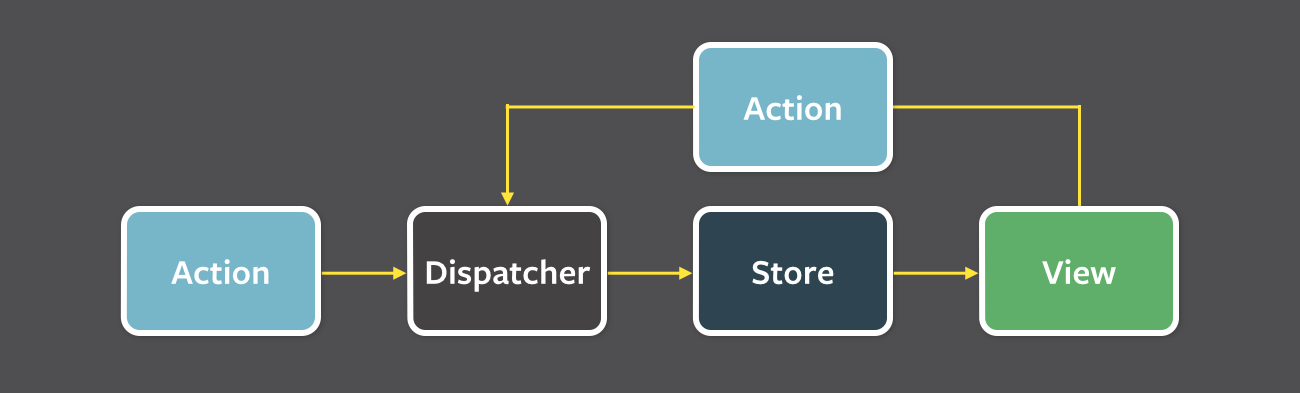
- Actions

- Redux is a predictable state container for JavaScript applications, most commonly used with React. It helps you manage and centralize your application’s state in a single source of truth, enabling easier debugging, testing, and maintenance—especially in large or complex applications. Redux core is tiny library(about 2.5kB gzipped) and has no dependencies.
-
Redux follows three fundamental principles:
- Single source of truth: The state of your whole application is stored in an object tree within a single store. The single state tree makes it easier to keep track of changes over time and debug or inspect the application.
const store = createStore(reducer);
- State is read-only: The only way to change the state is to emit an action, an object describing what happened. This ensures that neither the views nor the network callbacks will ever write directly to the state.
const action = { type: 'INCREMENT' };
store.dispatch(action);
- Changes are made with pure functions(Reducers): To specify how the state tree is transformed by actions, you write reducers. Reducers are just pure functions that take the previous state and an action as parameters, and return the next state.
function counter(state = 0, action) {
  switch (action.type) {
    case 'INCREMENT':
      return state + 1;
    case 'DECREMENT':
      return state - 1;
    default:
      return state;
  }
}
-
While Redux offers a powerful and predictable state management solution, it comes with a few trade-offs when compared to Flux. These include:
- Immutability is essential
Redux enforces a strict immutability model for state updates, which differs from Flux’s more relaxed approach. This means you must avoid mutating state directly. Many Redux-related libraries assume immutability, so your team must be disciplined in writing pure update logic. You can use tools likeredux-immutable-state-invariant,Immer, orImmutable.jsto help enforce this practice, especially during development. - Careful selection of complementary packages
Redux is more minimal by design and provides extension points such as middleware and store enhancers. This has led to a large ecosystem, but it also means you must thoughtfully choose and configure additional packages for features like undo/redo, persistence, or form handling—something Flux explicitly leaves out but may be simpler to manage in smaller setups. - Limited static type integration
While Flux has mature support for static type checking with tools like Flow, Redux’s type integration is less seamless. Although TypeScript is commonly used with Redux now, early Flow support was limited, and more boilerplate was required for static type safety. This may affect teams that rely heavily on type systems for large codebases.
- Immutability is essential
-
mapStateToProps()is a utility which helps your component get updated state (which is updated by some other components):const mapStateToProps = (state) => { return { todos: getVisibleTodos(state.todos, state.visibilityFilter), }; };
mapDispatchToProps()is a utility which will help your component to fire an action event (dispatching action which may cause change of application state):const mapDispatchToProps = (dispatch) => { return { onTodoClick: (id) => { dispatch(toggleTodo(id)); }, }; };
It is recommended to always use the “object shorthand” form for the
mapDispatchToProps.Redux wraps it in another function that looks like (…args) => dispatch(onTodoClick(…args)), and pass that wrapper function as a prop to your component.
const mapDispatchToProps = {
  onTodoClick,
};
-
Dispatching an action within a reducer is an anti-pattern. Your reducer should be without side effects, simply digesting the action payload and returning a new state object. Adding listeners and dispatching actions within the reducer can lead to chained actions and other side effects.
-
You just need to export the store from the module where it created with
createStore(). Also, it shouldn't pollute the global window object.store = createStore(myReducer); export default store;
-
- DOM manipulation is very expensive which causes applications to behave slow and inefficient.
- Due to circular dependencies, a complicated model was created around models and views.
- Lot of data changes happens for collaborative applications(like Google Docs).
- No way to do undo (travel back in time) easily without adding so much extra code.
-
These libraries are very different for very different purposes, but there are some vague similarities.
Redux is a tool for managing state throughout the application. It is usually used as an architecture for UIs. Think of it as an alternative to (half of) Angular. RxJS is a reactive programming library. It is usually used as a tool to accomplish asynchronous tasks in JavaScript. Think of it as an alternative to Promises. Redux uses the Reactive paradigm because the Store is reactive. The Store observes actions from a distance, and changes itself. RxJS also uses the Reactive paradigm, but instead of being an architecture, it gives you basic building blocks, Observables, to accomplish this pattern.
-
You need to write a root reducer in your application which delegate handling the action to the reducer generated by
combineReducers().For example, let us take
rootReducer()to return the initial state afterUSER_LOGOUTaction. As we know, reducers are supposed to return the initial state when they are called withundefinedas the first argument, no matter the action.const appReducer = combineReducers({ /* your app's top-level reducers */ }); const rootReducer = (state, action) => { if (action.type === "USER_LOGOUT") { state = undefined; } return appReducer(state, action); };
In case of using
redux-persist, you may also need to clean your storage.redux-persistkeeps a copy of your state in a storage engine. First, you need to import the appropriate storage engine and then, to parse the state before setting it to undefined and clean each storage state key.const appReducer = combineReducers({ /* your app's top-level reducers */ }); const rootReducer = (state, action) => { if (action.type === "USER_LOGOUT") { Object.keys(state).forEach((key) => { storage.removeItem(`persist:${key}`); }); state = undefined; } return appReducer(state, action); };
-
You can use Context in your application directly and is going to be great for passing down data to deeply nested components which what it was designed for.
Whereas Redux is much more powerful and provides a large number of features that the Context API doesn't provide. Also, React Redux uses context internally but it doesn't expose this fact in the public API.
Aspect Context API Redux Purpose Dependency injection — passes data through the tree without prop drilling Full state-management library with a predictable, centralized store State updates Plain useState/useReducernext to the provider; no built-in middlewareActions + reducers, with middleware support ( redux-thunk,redux-saga, etc.)Performance Every consumer re-renders on any value change unless you split contexts/memoize Uses selectors ( useSelector/connect) so components only re-render when the selected slice changesDevTools None built-in Time-travel debugging, action logs via Redux DevTools Async logic You wire it yourself (custom hooks, effects) Standardized patterns via middleware Boilerplate Minimal — just createContext/useContextMore setup, though Redux Toolkit reduces this significantly Not entirely — they solve overlapping but different problems, so the right choice depends on the app's needs:
- Context is a good fit for low-frequency, mostly-static data that many components need (theme, locale, authenticated user, feature flags). Combined with
useReducer, it can even model simple local/global state without pulling in Redux (see Can you combine useReducer with useContext?). - Redux is still preferable for large apps with complex, frequently-updating state, cross-cutting concerns like caching/undo/logging, a need for middleware (async flows, side effects), or debugging tools like time-travel and action replay.
- Performance matters: Context has no built-in mechanism to prevent unnecessary re-renders of all consumers when the provided value changes, whereas Redux's
useSelectorre-renders only the components that depend on the changed slice of state.
In short, Context is a simpler tool for prop-drilling/dependency-injection use cases, while Redux remains a more robust, scalable option for complex application-wide state management. Many apps use both together — Context for simple, rarely-changing values and Redux (or another store) for the rest.
- Context is a good fit for low-frequency, mostly-static data that many components need (theme, locale, authenticated user, feature flags). Combined with
-
Reducers always return the accumulation of the state (based on all previous and current actions). Therefore, they act as a reducer of state. Each time a Redux reducer is called, the state and action are passed as parameters. This state is then reduced (or accumulated) based on the action, and then the next state is returned. You could reduce a collection of actions and an initial state (of the store) on which to perform these actions to get the resulting final state.
-
You can use
redux-thunkmiddleware which allows you to define async actions.Let's take an example of fetching specific account as an AJAX call using fetch API:
export function fetchAccount(id) {
  return (dispatch) => {
    dispatch(setLoadingAccountState()); // Show a loading spinner
    fetch(`/account/${id}`, (response) => {
      dispatch(doneFetchingAccount()); // Hide loading spinner
      if (response.status === 200) {
        dispatch(setAccount(response.json)); // Use a normal function to set the received state
      } else {
        dispatch(someError);
      }
    });
  };
}

function setAccount(data) {
  return { type: "SET_Account", data: data };
}
-
Keep your data in the Redux store, and the UI related state internally in the component.
-
The best way to access your store in a component is to use the
connect()function, that creates a new component that wraps around your existing one. This pattern is called Higher-Order Components, and is generally the preferred way of extending a component's functionality in React. This allows you to map state and action creators to your component, and have them passed in automatically as your store updates.Let's take an example of
<FilterLink>component using connect:import { connect } from "react-redux"; import { setVisibilityFilter } from "../actions"; import Link from "../components/Link"; const mapStateToProps = (state, ownProps) => ({ active: ownProps.filter === state.visibilityFilter, }); const mapDispatchToProps = (dispatch, ownProps) => ({ onClick: () => dispatch(setVisibilityFilter(ownProps.filter)), }); const FilterLink = connect(mapStateToProps, mapDispatchToProps)(Link); export default FilterLink;
Due to it having quite a few performance optimizations and generally being less likely to cause bugs, the Redux developers almost always recommend using
connect()over accessing the store directly (using context API).