


The tldr-pages project is a collection of community-maintained help pages for command-line tools, that aims to be a simpler, more approachable complement to traditional man pages.
Maybe you're new to the command-line world. Perhaps you're just a little rusty or can't always recall the arguments for commands like lsof, or tar?
It certainly doesn't help that, in the past, the first option explained in man tar was:
$ man tar
...
-b blocksize
   Specify the block size, in 512-byte records, for tape drive I/O.
   As a rule, this argument is only needed when reading from or writing to tape drives,
   and usually not even then as the default block size of 20 records (10240 bytes) is very common.
...
There is room for simpler help pages focused on practical examples. How about:
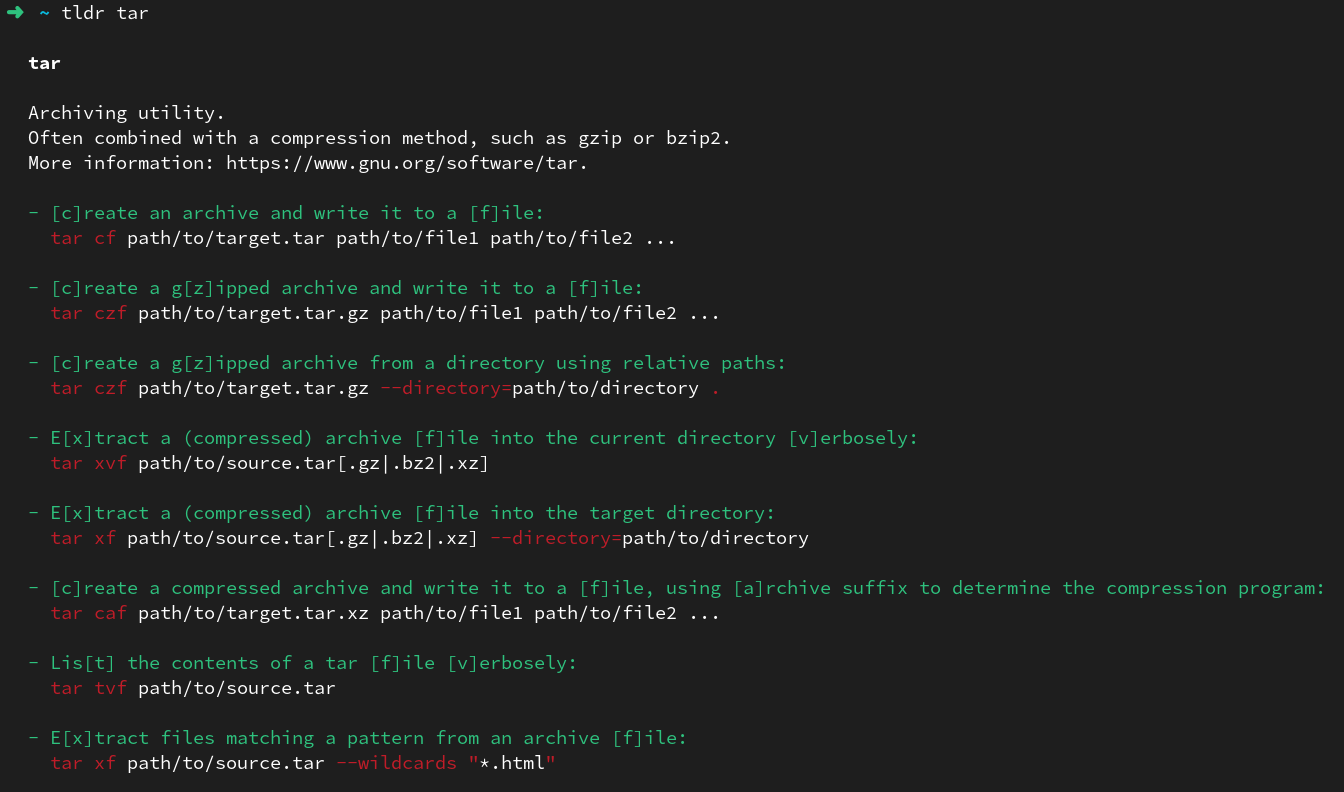
This repository is just that: an ever-growing collection of examples for the most common UNIX, Linux, macOS, FreeBSD, NetBSD, OpenBSD, SunOS, Android, Windows, Cisco IOS, and DOS command-line tools.
Tip
For browsing without installing a client on your computer, see the web client at https://tldr.inbrowser.app (with offline support using PWA).
There are several official clients available.
The official Python client can be installed from PyPI via pipx (or other package managers):
pipx install tldrLinux and Mac users can also install the official Rust Client using Homebrew, Cargo (or other package managers on other operating systems):
brew install tlrccargo install tlrc --lockedWindows users can also install the official Rust Client using Winget (or other package managers on other operating systems):
winget install tldr-pages.tlrcAlternatively, you can also use the official Node.js client, although it has fallen behind in updates:
npm install -g tldrThen you have direct access to simplified, easy-to-read help for commands, such as tar,
accessible through typing tldr tar instead of the standard